

Mastering Your Device: Select Vape Pen Charging Instructions
Owning a premium vaping device is only half the battle; knowing how to maintain its power is what ensures a consistent and satisfying experience. Following the correct select vape pen charging instructions is crucial for extending the lifespan of your battery and ensuring the safety of your device. Whether you are a newcomer to the world of vaping or a seasoned pro, improper charging habits can lead to decreased battery capacity or even device failure. In this guide, we will walk you through everything you need to know to keep your pen powered up and performing at its peak.
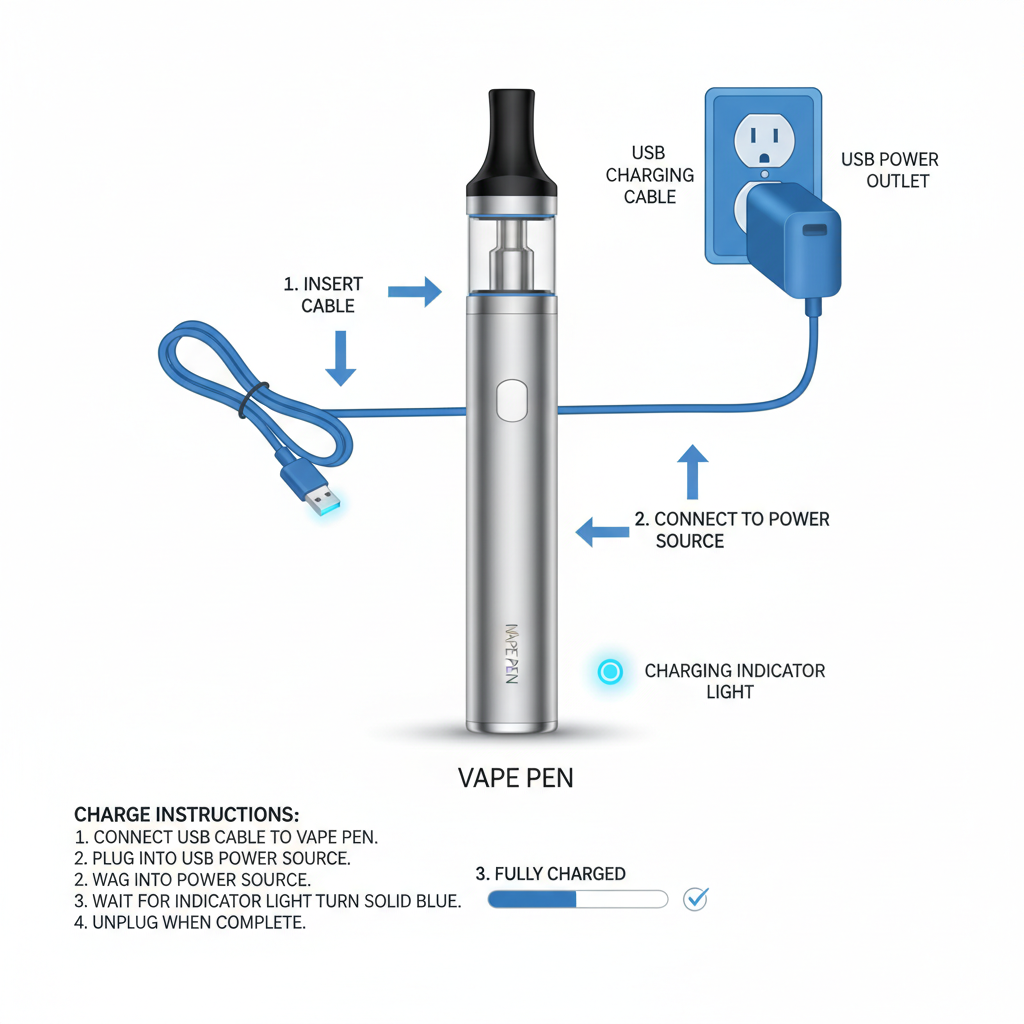
Getting Started with Select Vape Pen Charging Instructions
To begin, it is essential to identify the charging port of your device. Most modern pens utilize a USB-C or Micro-USB connection. When following select vape pen charging instructions, always ensure that the charging cable is fully inserted into the port. Avoid forcing the cable, as this can damage the internal pins. We recommend using the cable provided with your device to ensure compatibility with the voltage requirements. Charging your device on a flat, non-flammable surface is a safety priority that should never be overlooked.
Pro Tip: Always check the charging port for lint or debris before plugging in your cable to ensure a secure electrical connection.
Choosing the Right Power Source for Your Vape Pen
Not all USB ports are created equal. While it may be tempting to use a high-wattage fast charger from a modern smartphone, this can sometimes overheat the smaller batteries found in vape pens. For the best results according to select vape pen charging instructions, a computer USB port or a standard 5V/1A wall adapter is ideal. Overcharging or using excessive voltage can degrade the lithium-ion cells, leading to a shorter overall battery life.
Recommended Power Sources:
• Laptop or PC USB ports (Safest option)
• UL-Certified 5V/1A wall adapters
• Dedicated vape charging docks
• Avoid: Ultra-fast "Quick Charge" blocks
Understanding Charging Indicators and Timelines
Knowing when your device is fully charged prevents unnecessary wear on the battery. Most pens feature an LED indicator that changes color or stops blinking once the cycle is complete. By adhering to the select vape pen charging instructions, you can typically expect a full charge within 1 to 2 hours depending on the battery capacity.
Best Practices for Long-Term Battery Health
To maintain the efficiency of your device, avoid letting the battery drain completely to 0% before recharging. Lithium-ion batteries prefer to stay between 20% and 80% capacity. Following these select vape pen charging instructions will prevent the "deep discharge" state that can permanently reduce the battery's capacity. Additionally, avoid charging your pen in extreme temperatures, such as on a hot car dashboard or in a freezing environment, as this can cause chemical instability within the cell.
Common Charging Issues and How to Fix Them
If your device refuses to charge, don't panic. Often, the issue is external. First, try a different USB cable; cables are the most common point of failure. If that doesn't work, try a different power outlet. If you are still struggling, refer back to the select vape pen charging instructions to see if there is a reset button or a specific sequence needed to activate the charging circuit. Never attempt to open the battery casing yourself, as this poses a significant safety risk.
Safety Precautions When Charging Your Device
Safety should always be the priority. Never leave your vape pen charging unattended overnight. While most modern devices have overcharge protection, a malfunction in the cable or the wall adapter could potentially lead to a fire. Always ensure the device is placed on a hard, cool surface—avoiding beds, sofas, or carpets which can trap heat. If you notice the device becoming excessively hot to the touch or if you smell something burning, disconnect it immediately. By strictly following the select vape pen charging instructions, you mitigate these risks effectively.
Conclusion: Powering Your Experience Correctly
Properly managing your battery is the secret to a long-lasting and reliable vaping experience. From choosing the right USB port to monitoring the LED indicators, every step of the select vape pen charging instructions serves a purpose in protecting your investment. By avoiding extreme temperatures, using compatible cables, and practicing safe charging habits, you ensure that your device is always ready when you are. Stay safe, stay powered, and enjoy the premium quality of your Select device.
Frequently Asked Questions (FAQs)
Can I use a fast charger for my select vape pen?
It is generally not recommended to use "Fast Chargers" or "Quick Charge" blocks designed for high-end smartphones. Most vape pens are designed for a low-current charge (typically 5V/1A). Using a high-wattage charger can cause the battery to overheat, which may significantly shorten the battery's overall lifespan or, in rare cases, damage the internal circuitry. For the safest experience, stick to a computer USB port or a standard, low-power wall adapter as suggested in the official charging guidelines.
How long should it take to fully charge my vape pen?
While charging times can vary based on the battery capacity and the power source used, most devices typically take between 60 to 120 minutes to reach a full charge. If your device takes significantly longer than two hours, it may be a sign of a faulty cable or a degrading battery. If it charges "instantly" (e.g., under 15 minutes), the battery may no longer be holding a proper charge and might need to be replaced to ensure consistent vapor production.
What should I do if my vape pen won't charge?
The first step is to troubleshoot the hardware. Try using a different USB cable and a different power source (like switching from a wall outlet to a laptop port). Often, cables develop internal breaks that aren't visible. Next, check the charging port for any debris or lint; use a can of compressed air to gently clean it out. If the LED doesn't light up at all after these steps, the battery may have reached the end of its life cycle or there may be an internal hardware failure. You can find more support and genuine accessories on the SXZ Pods official website.
Is it safe to charge my vape pen overnight?
While many modern devices have built-in overcharge protection, it is generally advised against charging your device overnight or leaving it plugged in unattended. Lithium-ion batteries can be volatile if a component fails or if the device overheats. To ensure maximum safety, only charge your device while you are awake and able to monitor it. Once the LED indicator signals that the device is fully charged, disconnect it immediately to prevent unnecessary stress on the battery cells.
Latest News
-
Mastering Your Device with Essential o pen vape instructions
NewsApr.09,2026 -
Comprehensive Mist Vape Pen Instructions for Optimal Vaping Experience
NewsApr.07,2026 -
Comprehensive Hybrid Vape Pen Instructions for Optimal Performance and Safety
NewsApr.04,2026 -
Comprehensive Purple Vape Pen Instructions for Safe and Enjoyable Use
NewsMar.31,2026 -
Comprehensive In House Vape Pen Charging Instructions for Optimal Performance
NewsMar.28,2026